Page Windows à l'allumage sur Delta

Bonjour,
Je suis en cours d'achat d'un Delta sur un site de vente bien connu, à réception de l'appareil, il ne captait aucun signal GPS.
J'ai tenté une mise à jour car il était en version 2.7 alors que le mien est en 2.9, la mise à jour ne voulait pas s'installer, le message d'erreur "internet erreur 404" apparaissait à chaque tentatives.
J'ai ensuite lancé une réparation, j'ai eu le même message.
Je l'ai ensuite débranché pour changer la batterie car elle était faible, au redémarrage, je n'ai plus que la page windows à l'affichage...
Une idée ?
Merci d'avance
-

OK, no problem. Before we are going to recover the device, can you show me the content of:
C: \ Benutzer \ Laurent \ OneDrive \ Dokumente \ CompeGPS \ Daten \ CompeGPS_Backup \ DE00003503 \ 270 \ 202409091146_all\Twonav
and
C: \ Benutzer \ Laurent \ OneDrive \ Dokumente \ CompeGPS \ Daten \ CompeGPS_Backup \ DE00003503 \ 270 \ 202409091146_all\TwoNavData
-
Strange but maybe Land didn't backup all file.
Steps to recovery.
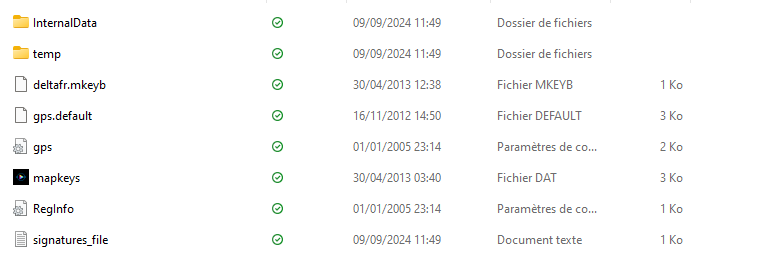
1) Copy the content of C:\User\Laurent\OneDrive\Documents\CompeGPS\data\CompeGPS_Backup\DE00003503\270\202409091146_all
into the root of the Delta.
Delta root should look like this afterwards:

2) Download https://www.twonav.com/download/TwoNav_Delta_3.2.7.zip and extract its content into the Twonav folder of the Delta. Twonav folder in Delta should afterwards contain all these files & folders & the files from C:\User\Laurent\OneDrive\Documents\CompeGPS\data\CompeGPS_Backup\DE00003503\270\202409091146_all\Twonav :
BTCore
InternalData
profile_templates
symbols
TCPMP
temp
advice_ca.txt
advice_de.txt
advice_en.txt
advice_es.txt
advice_fr.txt
advice_hu.txt
advice_it.txt
advice_nl.txt
advice_pl.txt
aygshell.dll
borders.dat
CompeHAL.dll
CompePlugIn_ECW.dll
CompePlugIn_JPG_CE.dll
CompePlugIn_Navionics2005.dll
CompePlugIn_PNG_CE.dll
CompePlugIn_SVG_CE.dll
CompePocketEngine.dll
CompeResources.dll
CompeTwoNav.exe
datumsb.dat
default.hipcolrs
gps.default
highcontrast.hipcolrs
idioma.def
keys.dat
libEGL.dll
libGLES_CM_NoE.dll
licenses.txt
lowcontrast.hipcolrs
NAV61CSAPI.dll
NCScnet.dll
NCSEcw.dll
NCSUtil.dll
nfBT.dll
options.cxml
projections.zip
properties.cxml
signatures_file.txt
timezones.dat
TwKeys_D.cxml
TwMenuMAIN_D.cxml
TwMenuTOOLBAR_D.cxml
TwoNav_Delta.exe
TwTools_D.cxml
UsbSplash.exe
zlibce.dllReboot the device and it should be restored.
-
Glad to here you were successful. There was a major user interface change from version 2.* to version 3.*. If You prefer version 2.*, the last version 2.* is v2.9 which can be downloaded here:
https://statics.twonav.com/download/TwoNavDelta_2.9.zip
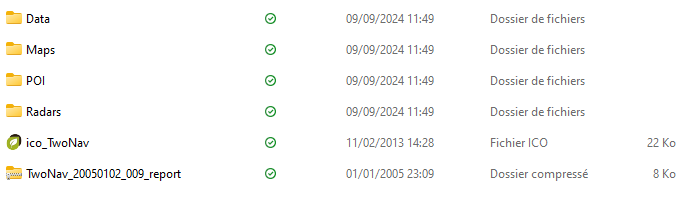
Just replace the content of the Twonav folder with its content and this:
One last question:
Do you have enough Ondedrive space to keep all the Land stuff (maps etc.) Online?
If not add another data folder in the configuration dialog, close Land and move all the TwoNavData stuff into this folder, open Land again and delete the Onedrive folder entry in the configuration.
Bitte melden Sie sich an, um einen Kommentar zu hinterlassen.
Kommentare
37 Kommentare