Loading maps

-

Hello,
- What device did you download it on?
- TwoNav Application?
- TwoNav GPS
- Land
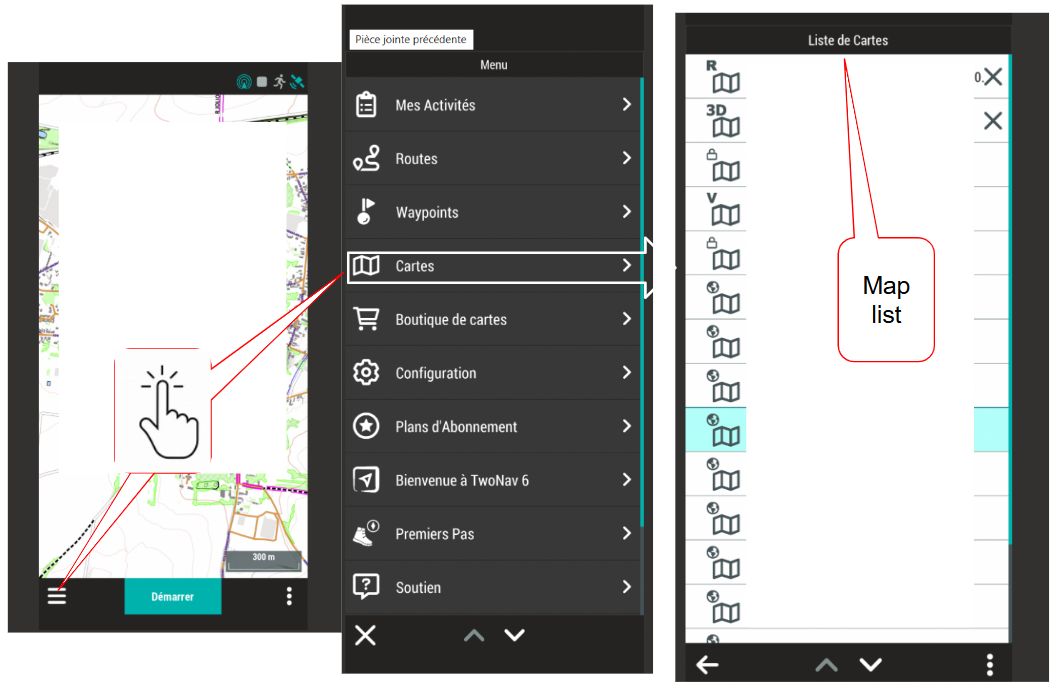
In principle, you just need to use the Map menu, select the map, and tap it (its name in the menu).
https://support.twonav.com/hc/en-us/articles/10715542599324-How-to-install-Maps
Best regards
-
-
Thierry, thanks.
I've done that but I just get to a blank screen with pink square - which where I assume the map should be! I've even drawn a route on it, but there is no map visible.
I've tried zooming in and out but there's still nothing there.
I think I must be missing a simple obvious step somewhere. -
I see for tappenier map the scale is 1/30 000, if the GPS Zoom screen is up to 1/30 00 (for exemple 1/10 000) on the screen you cannot see a good map, détails was delayed. For hiking , MBT the map scale must be up to 1/20 000 (1/10 000 is the best choice) for cycling you can use less scale with less screen zoom or scale 1/50 000.
-
Well, you don't seem to be very tech-savvy.
- It would have been helpful to know if you were able to load and view another map. Terrain maps are free, so it's essentially free.
- Anyway, no answer on that point...
Next, the problem is either an error in the loading process or a map loading issue (the tiles with the correct resolution aren't loaded).
- So it would be good to check the status of the loaded map: go to the Map menu and tap the map name, then the map icon.
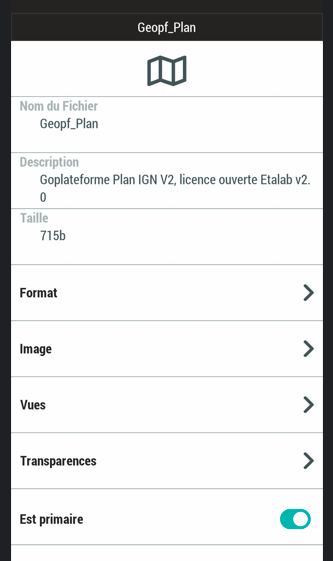
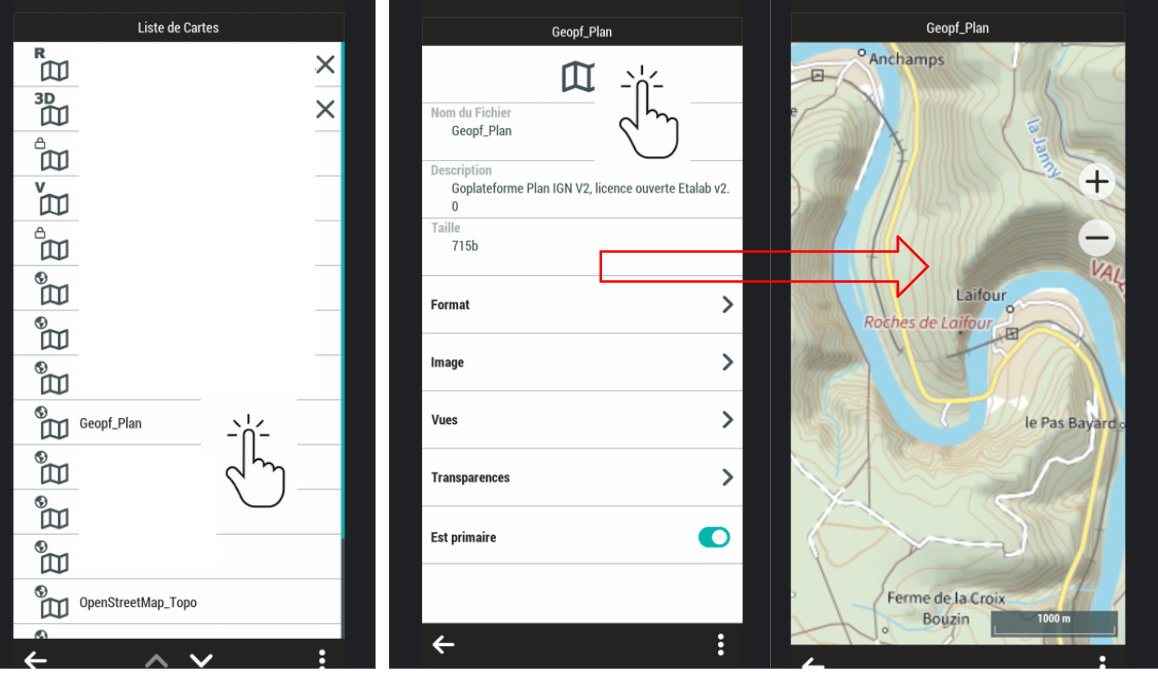
Then, the purchased map remains available on your account, so you're free to delete the map from your smartphone and then reinstall it (there's no limit).
LONG PRESS on the map name in the list open a new window with "delete.."
DELETE this Map
OFF / ON your Smart phone
and go to
Map
.... on the right bottom
Upload purchassed map
Best regards
-
Hi Thierry, sorry about my tech ability - I'm probably not as young as you!
I've downloaded a topo map (Isle of Man) but it's just the same as the original one - an empty frame.
I've deleted and re-downloaded the original Tappenier map but it's still just an empty frame.
My phone is android 15 and One UI 7.0 -
Hello,
The Tappenier map is 19.57Mb. The IoM Topo 25K is 55.58Mb.
Your smartphone has loaded two valid maps.
If this weren't the case, you wouldn't be able to read the status or size of these maps because the file would be corrupted (no transfer completion confirmation).
- A vector map covering 50 km x 50 km is 36 MB.
- A raster map covering 10 km x 10 km (zoom 10 to zoom 17) is 300 MB.
Tappenier says it's 20 MB (I think they're 10 km x 10 km tiles), which means you imported a 20 MB map, that is, 10 times smaller than a raster map that goes to zoom 17.
A quick calculation suggests that your map is at zoom level Z15. So, to check if this is the right track, I created a raster map covering 10 km x 10 km, ranging from zoom level 10 to zoom level 15, and it's 16 MB (so we're on the right track).
Z15 means 3.2 m per pixel; you should see the smaller roads at a scale of 1:15,000 (Z14 is 1:35,000).
It seems to me that your Tappenier map is at its maximum zoom level of 14 and only shows low zoom levels below Z10 (given the marketing for this type of map).
You should see something on the screen (the larger roads). It's likely that your smartphone doesn't have the resources to handle this type of image.
If you had Land on a PC the test is easy (Or Qmap) these two programs open this type of map, you could have made sure that your maps are readable (or not) on another device.
Import an OSM 21 Qx map; it's a vector format that covers your country. It's not a raster map, so the display technology is different. These maps aren't very expensive.
Best regards
-

I have had a very similar problem so this post was a great help to me. I was downloading ordinance survey maps onto an iPhone and although they showed up as being in my collection of Maps I couldn’t see them on the screen so after reading your post I closed the phone down, started it up again and they were visible. So a great help after I had struggled for a couple of hours!
Vous devez vous connecter pour laisser un commentaire.
Commentaires
19 commentaires